
Search engines like Google and Bing and increasingly AI platforms like ChatGPT have to figure out what a page is actually about before they can show it to the right person. They've gotten remarkably good at this, but explicit signals still remove ambiguity that pure text analysis can't always resolve on its own.
That's exactly what schema markup is for. It's a way of labeling the entities on your page a product, a review, an event, a local business in a format machines can read directly, instead of having to infer meaning from plain text.
This guide covers what schema markup is, the schema types worth knowing, and a practical, step-by-step process for adding it to your site the same framework we use internally at Contentiris when auditing client sites.
Use schema markup to win rich results not to hack visibility
The real, proven benefit of schema markup is eligibility for rich results: star ratings, prices, availability badges, and other enhanced listings that can lift your click-through rate (CTR). It is not a direct Google ranking factor, and it will not move the needle on your visibility inside AI tools by itself.
Schema markup pays off most on pages where rich results are actually possible:
Product pages
Review content
Recipes
Articles and blog posts
Local business pages
Add schema because it helps search engines render richer, more useful listings for your content not because someone told you it's a shortcut to more traffic or better rankings.
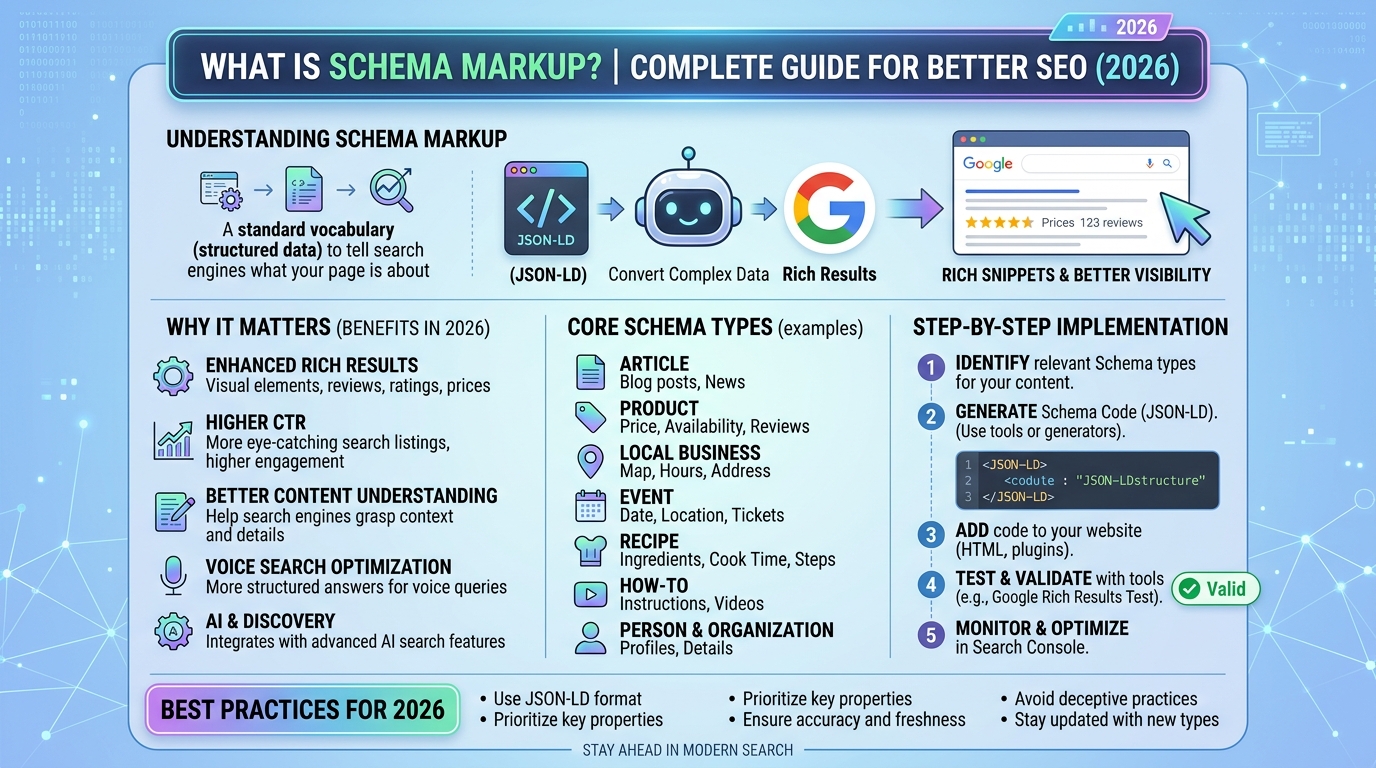
What is schema markup in SEO, and why does it matter?
Schema markup (a form of structured data) is a block of code added to your site that tells search engines and potentially AI systems more precisely what your content is about. It matters for SEO mainly because it unlocks rich snippets: the enhanced search results that show star ratings, prices, stock status, and similar details right inside the search listing.
When a rich snippet appears, a searcher can evaluate your page against their intent before they even click.
That translates into two concrete benefits:
Higher click-through rates: a listing with a rating and a price often outperforms a plain blue link, because it answers part of the searcher's question up front.
More SERP real estate: rich results simply take up more visual space, which can push competing listings further down the page.
Without any schema markup, your result will typically appear as a standard blue link with a short description underneath it and if a competitor ranking near you does have rich results, your listing will look comparatively plain by contrast.
Picture two results ranking next to each other for the same product search. One shows only a title and description. The other shows a star rating, a specific price range, and a delivery note. Even positioned identically on the page, the second listing is far more likely to earn the click because it's already answering the searcher's underlying question.
Keep in mind: adding schema markup makes you eligible, not guaranteed. Google ultimately decides whether to render a rich result at all.
Does schema markup affect rankings?
No. Google has been explicit that structured data does not influence ranking position. What it can influence is your click-through rate once you're already ranking which can lift traffic even though your position in the results hasn't moved.
How does schema markup actually work?
When a search engine's crawler reads your page's HTML, it looks for a script using the standardized vocabulary published by Schema.org. That vocabulary lets you state facts explicitly rather than leaving them to be inferred for example, marking up $299 as the specific price of a specific Product, rather than making the crawler guess what that number refers to.
That explicit labeling helps search engines classify your content accurately and determine which rich-result formats it might qualify for. Schema.org itself is simply the reference documentation everyone Google, Bing, and structured-data tools alike builds against.
Does schema markup help with AI visibility?
You do not need schema markup to show up in AI-generated answers. Google has stated there's no special Schema.org markup required to appear in AI Overviews or AI Mode. That said, schema markup remains a solid SEO habit worth keeping regardless, since it costs little and clearly helps with traditional rich results.
Schema markup does give search systems unambiguous information about the entities on a page, which may reduce confusion for AI systems too but there's no confirmed, direct link between adding schema and being cited or retrieved by an AI tool. Google's own guidance on ranking well in AI search does say your structured data should match the visible content on the page, but frames that as part of the same broad SEO fundamentals that apply across Search generally, not as an AI-specific lever.
Microsoft's guidance for optimizing content toward Bing's AI answers is a little more direct, describing schema as code that helps search engines and AI systems understand your content but it doesn't go further than that in explaining measurable impact.
In short: we can't say definitively that schema markup improves AI visibility, and it's unclear whether tools like ChatGPT or Claude weigh structured data the way traditional search engines do.
The most common types of schema markup
Google supports dozens of schema types, but most sites only need a handful of them.
Organization markup
Organization schema tells search engines the basics about your business name, logo, address, contact details. If your business qualifies for a Google knowledge panel, this markup can influence what shows up there, including details like return policies for merchants.
Product snippet markup
This is one of two product-related schema types, used on pages where a visitor can read about a product but not buy it directly think editorial reviews or comparison content. It can surface:
Ratings and reviews: aggregated opinions from readers or customers
Pros and cons: strengths and weaknesses (available only on editorial review pages)
Price and availability: general pricing context without a direct purchase path
This type is especially useful for review sites, affiliate publishers, and any ecommerce brand showcasing products it doesn't sell on that particular page.
Merchant listing markup
The second product-related type, used specifically on pages where someone can complete a purchase. It can display:
Pricing and discounts: standard price, sale price, active promotions
Stock status: in stock, back-ordered, or sold out
Shipping and returns: delivery windows, shipping costs, return terms
If you run an online store, this is the schema type doing the heavy lifting on your product pages.
Review schema markup
Review markup enables star ratings and review summaries in search results, and Google supports it across several content types products, local businesses, movies, books, software, and recipes.
It generally appears in one of two forms:
A single rating, tied to one named reviewer
An aggregate rating, an average across many reviews, typically shown with a total review count in parentheses
One important restriction: Review and AggregateRating markup has to describe an entity you don't control the reviews for. A business marking up its own testimonials under its own Organization or LocalBusiness schema won't be granted star-rating rich results Google requires independence between the reviewer and the entity being reviewed.
Article markup
Article markup helps search engines parse news pieces, blog posts, and sports coverage, and it's what makes a page eligible for rich results in Google Search and Google News including how the headline, byline, and publish date are displayed.
Local business markup
Local business schema communicates the essentials for a physical location: address, phone number, hours of operation. It's a natural fit for restaurants, storefronts, and any service business trying to win local search and Maps visibility, since it reinforces the accuracy of your listed business details.
Breadcrumb markup
Breadcrumb schema tells search engines where a given page sits within your site's structure something like Home > Laptops > Gaming Laptops. Google can use this to render a breadcrumb trail directly in the search result, giving users a sense of where a page fits before they ever click through. As with any structured data, showing the breadcrumb trail isn't guaranteed.
Schema markup examples
Here's what Article schema looks like as JSON-LD:
{
@context: https://schema.org,
@type: Article,
headline: A Practical Guide to Schema Markup,
image: https://www.example.com/images/schema-guide-cover.jpg,
author: {
@type: Person,
name: Chris Hanna
},
datePublished: 2026-07-30,
dateModified: 2026-07-31
}
Here's an example of Product schema:
{
@context: https://schema.org,
@type: Product,
name: Over-Ear Wireless Headphones,
image: https://www.example.com/images/wireless-headphones.jpg,
description: Wireless over-ear headphones with active noise cancellation and a 28-hour battery.,
sku: WH-3390,
brand: {
@type: Brand,
name: AudioNova
},
offers: {
@type: Offer,
url: https://www.example.com/products/wireless-headphones,
priceCurrency: USD,
price: 129.99,
availability: https://schema.org/InStock
}
}
And here's LocalBusiness schema for a restaurant:
{
@context: https://schema.org,
@type: Restaurant,
name: Olive & Ember,
image: https://www.example.com/images/olive-and-ember-storefront.jpg,
address: {
@type: PostalAddress,
streetAddress: 48 Harbor Street,
addressLocality: Austin,
addressRegion: TX,
postalCode: 73301,
addressCountry: US
},
telephone: +1-512-555-0148,
openingHoursSpecification: {
@type: OpeningHoursSpecification,
dayOfWeek: [Monday, Tuesday, Wednesday, Thursday, Friday],
opens: 17:00,
closes: 23:00
},
priceRange: $$$
}
How to add schema markup to your website, step by step
1. Choose the right schema type for the page
Match the schema type to the page's actual purpose. A quick reference:
Page type | Best-fit schema type |
Homepage or About page | Organization |
Blog post or news article | Article |
Product page with direct checkout | Product (merchant listing) |
Product review page, no direct purchase | Product (snippet), with nested Review or AggregateRating |
Physical business location page | LocalBusiness, or a more specific subtype (Restaurant, Store, etc.) |
More markup isn't automatically better resist the urge to tag every entity on a page just because you can.
2. Generate the schema
You have four realistic paths here: write it by hand, generate it with an AI tool, use a plugin if you're on WordPress, or run it through Google's Structured Data Markup Helper.
Writing it manually gives you the most control, provided you're comfortable with schema.org's vocabulary. You add a <script type=application/ld+json> block to the page's <head> (or <body>) with the relevant properties for your chosen type. Once you're used to the syntax, this scales well you can reuse the same template across similar pages.
Generating it with an AI tool like ChatGPT, Gemini, or Claude is as simple as asking it to produce JSON-LD for a given URL or piece of content. It's fast, but not foolproof always validate what comes back before publishing it.
Note: Microdata and RDFa are alternative ways to implement structured data, but JSON-LD is what most SEO practitioners recommend today, and it's the format used throughout this guide.
Using a WordPress plugin (Yoast SEO, Rank Math, Schema Pro, etc.) is the lowest-effort route, since these plugins add schema without requiring you to touch code directly. In Yoast, for example, you'd install and activate the plugin, then set your site's identity organization or person under Site representation in the General settings, including a name and logo Yoast will reuse automatically. For individual pages, the Yoast sidebar in the WordPress editor includes a Schema tab where you select the page and content type, and the plugin fills in the corresponding markup.
Using Google's Structured Data Markup Helper works well for a one-off page: choose a schema type, paste in your URL, and click Start Tagging. Your page loads on one side of the screen with a list of data items on the other. Highlight a section say, your article's title and assign it to the matching field (in this case, Title). Repeat for every relevant property, then click Create HTML to generate the code. JSON-LD is the default output, though you can switch to Microdata if needed.
3. Add the markup to your site
Copy the generated code into your page's HTML either the <head> or <body> works. If you went the WordPress-plugin route, this step is typically handled for you automatically.
4. Validate before (and after) you publish
Run your markup through Google's Rich Results Test. Paste in a URL or the raw code, and the tool will flag any errors or warnings, alongside a summary of what schema it detected. Fix anything flagged directly in the code, rerun the test, and once it passes, push the update to your live page.
For ongoing monitoring, Google Search Console's Outsource Technical SEO Audit Services tool lets you check schema status on individual live pages, while the Enhancements and Shopping reports surface structured-data issues sitewide useful for catching problems before they quietly cost you rich-result eligibility.
Schema markup best practices
Prioritize pages that can actually earn rich results products, reviews, articles, and local business pages are where schema pays off most.
Only mark up what's genuinely relevant the schema type should match the page's real content, not just be added for the sake of coverage.
Keep it current revisit markup whenever the underlying details change, especially volatile fields like price or business hours.
Fill in every recommended property, not just the required ones LocalBusiness schema, for instance, can include hours, accepted payment methods, and location detail beyond the bare minimum.
Keep schema consistent with your other listings your Google Business Profile, social accounts, and website should all agree on the same core facts.
Use the most specific subtype available Restaurant instead of a generic LocalBusiness, for example.
Always validate invalid structured data can trigger a manual action from Google that makes a page ineligible for rich results. It won't hurt your rankings directly, but it will cost you visibility.
How to audit your site's schema markup
Manually checking schema page-by-page doesn't scale past a handful of URLs. For anything larger, run a full audit with Contentiris Site Audit.
After a full crawl, open the Markup section of your report to see a schema health score reflecting how much of your structured data is valid versus broken the higher the score, the fewer issues you have. From there, the Structured Data Items table lists every valid and invalid item Contentiris found, and clicking into any invalid entry shows exactly which fields are causing the problem a missing required image, a malformed price, and so on.
Once you've identified what's broken, regenerate the markup for those pages by hand, with an AI tool, or through your plugin and re-validate with the Rich Results Test before considering the fix complete.
Get a free audit and see exactly how this applies to your site.